To enable a participant to use the Hexoskin OneApp during the study, you must provide them with their unique login credentials. These are managed via the Hexoskin OneView dashboard.
1. Access the Participant List
-
Log in to the OneView dashboard.
-
Select the Subjects tab from the left-hand sidebar (indicated by the Subject Icon).

-
From the list, click on the specific Subject for the participant you are currently onboarding.
2. Retrieve the Unique Username
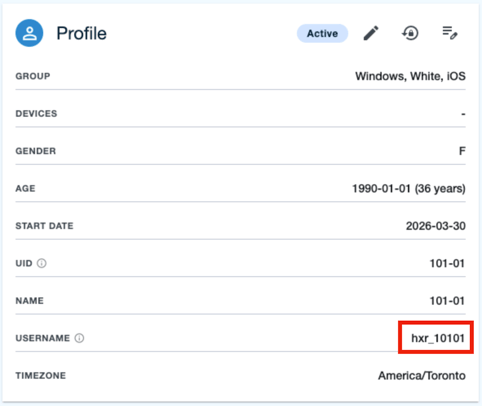
On the participant’s profile page, locate the Profile window (top-left corner).
-
The Username: This is automatically generated using the Study UUID and the Subject UID.
-
Action: Record this username exactly as shown to hand over to the participant.
3. Generate a Password
Participants do not have a default password; you must configure one before they can log in.
-
Find the Lock Icon: In the same Profile window, click the Lock Icon.

-
Set Password: Type in a secure password for the participant.
-
Save: Click Reset Password to finalize the credential.
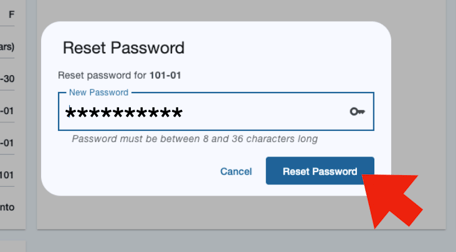
Note: The password must be between 8 and 36 characters.
If you need further support, please don't hesitate to contact us.